Vim - Delete a column

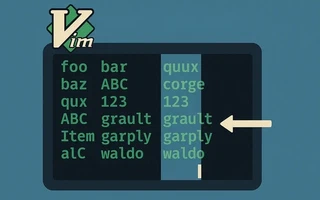
One of Vim’s big advantages over other editors is that it has several visual modes, which let you edit blocks of text spanning multiple lines.
Today I needed to delete the characters from column 5 to column 10 of a file, between lines 20 and 30.
One option would be to use regular expressions, but in Vim this can be done in a far less complex way.
Vim has several visual modes:
v:--VISUAL--V:--VISUAL LINE--<C-v>:--VISUAL BLOCK--
That last one was the solution to my problem.
- Go to line 20, column 5 (start of the block)
- Press
ctrl+v - Type 10 (the number of lines in the block)
- With the
ldirection key or the arrows, select up to column 10 (end of the block) - Delete the block with the
dcommand.

I’m a Brazilian computer engineer based in Germany, passionate about tech, science, photography, and languages.
I’ve been programming for about two decades already, exploring everything from mobile apps and web development to machine learning. These days I focus on cloud SRE and data engineering.
I volunteer in the open source and Python communities, helping organize PyCon DE and PyData Berlin, mentoring, and contributing with code and translations.
On my blog, I share Linux tips, setup guides, and personal notes I’ve written for future reference. I hope others find them helpful as well. The content is available in multiple languages.
Browse my gallery for some of my photography.
Away from the keyboard, you’ll find me at concerts, playing clarinet, cycling, scuba diving, or exploring new places, cultures, and cuisines.
Always happy to connect! 🙂