Hashicorp Vault in High Availability with Consul

Consul
HashiCorp Consul was created in 2014 as a DNS-SD (DNS based Service Discovery) to solve the problem of communication between microservices, but it also has other features such as health checking and key-value storage (KV Store).
Every node has a monitoring agent installed, which is responsible for securely sending the node’s information to one or more servers.
The servers keep a catalogue with the nodes’ information, such as which services are available on
each one and their status.
For high availability, having 3 to 5 servers is recommended. One of them will be elected leader.
Manual configuration
To understand the architecture in detail, it is worth doing the installation step by step. Further on I will show how to do the configuration using Docker-compose.
The installation process for Consul and Vault is described in detail in the official documentation.
In short, the steps are the following:
Start 5 machines running Linux
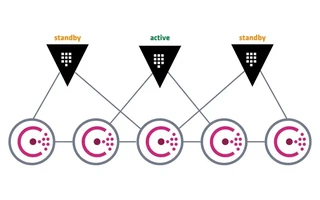
They can be in some cloud or local. Three will be for the Consul server and two for Vault.
In the free version, only one Vault node is active; the other nodes stay on standby, forwarding requests to the active node. If the node that was active becomes unavailable, another node is elected as the active one.
Consul will also be installed on the Vault machines, but in client mode.Set the hostnames
(vault-01)# echo "vault-01" > /etc/hostname
(vault-02)# echo "vault-02" > /etc/hostname
(consul-01)# echo "consul-01" > /etc/hostname
(consul-02)# echo "consul-02" > /etc/hostname
(consul-03)# echo "consul-03" > /etc/hostname
Install Consul on every machine
The official site has installation instructions for the most popular distributions.
On Arch Linux it would be this:
# pacman -S consulEdit the servers’ configuration file
# cat /etc/consul.d/consul_s1.json{ "server": true, "node_name": "$NODE_NAME", "datacenter": "dc1", "data_dir": "$CONSUL_DATA_PATH", "bind_addr": "0.0.0.0", "client_addr": "0.0.0.0", "advertise_addr": "$ADVERTISE_ADDR", "bootstrap_expect": 3, "retry_join": ["$JOIN1", "$JOIN2", "$JOIN3"], "ui": true, "log_level": "DEBUG", "enable_syslog": true, "acl_enforce_version_8": false }Edit the clients’ configuration file
# cat /etc/consul.d/consul_c1.json{ "server": false, "datacenter": "dc1", "node_name": "$NODE_NAME", "data_dir": "$CONSUL_DATA_PATH", "bind_addr": "$BIND_ADDR", "client_addr": "127.0.0.1", "retry_join": ["$JOIN1", "$JOIN2", "$JOIN3"], "log_level": "DEBUG", "enable_syslog": true, "acl_enforce_version_8": false }Edit the servers’ systemd unit file
# cat /etc/systemd/system/consul.service
### BEGIN INIT INFO
# Provides:          consul
# Required-Start:    $local_fs $remote_fs
# Required-Stop:     $local_fs $remote_fs
# Default-Start:     2 3 4 5
# Default-Stop:      0 1 6
# Short-Description: Consul agent
# Description:       Consul service discovery framework
### END INIT INFO

[Unit]
Description=Consul server agent
Requires=network-online.target
After=network-online.target

[Service]
User=consul
Group=consul
PIDFile=/var/run/consul/consul.pid
PermissionsStartOnly=true
ExecStartPre=-/bin/mkdir -p /var/run/consul
ExecStartPre=/bin/chown -R consul:consul /var/run/consul
ExecStart=/usr/local/bin/consul agent \
    -config-file=/usr/local/etc/consul/consul_s1.json \
    -pid-file=/var/run/consul/consul.pid
ExecReload=/bin/kill -HUP $MAINPID
KillMode=process
KillSignal=SIGTERM
Restart=on-failure
RestartSec=42s

[Install]
WantedBy=multi-user.target
Edit the clients’ systemd unit file
### BEGIN INIT INFO
# Provides:          consul
# Required-Start:    $local_fs $remote_fs
# Required-Stop:     $local_fs $remote_fs
# Default-Start:     2 3 4 5
# Default-Stop:      0 1 6
# Short-Description: Consul agent
# Description:       Consul service discovery framework
### END INIT INFO

[Unit]
Description=Consul client agent
Requires=network-online.target
After=network-online.target

[Service]
User=consul
Group=consul
PIDFile=/var/run/consul/consul.pid
PermissionsStartOnly=true
ExecStartPre=-/bin/mkdir -p /var/run/consul
ExecStartPre=/bin/chown -R consul:consul /var/run/consul
ExecStart=/usr/local/bin/consul agent \
    -config-file=/usr/local/etc/consul/consul_c1.json \
    -pid-file=/var/run/consul/consul.pid
ExecReload=/bin/kill -HUP $MAINPID
KillMode=process
KillSignal=SIGTERM
Restart=on-failure
RestartSec=42s

[Install]
WantedBy=multi-user.target
Check that every service is running
# systemctl daemon-reload
# systemctl start consul
# systemctl status consul
$ consul members $ consul operator raft list-peersOne of the servers should show up as the leader.
Install Vault on the two VMs
# pacman -S vaultEdit Vault’s configuration file
# cat /etc/vault/vault_s1.hcllistener "tcp" { address = "127.0.0.1:8200" cluster_address = "127.0.0.1:8201" tls_disable = "true" } storage "consul" { address = "127.0.0.1:8500" path = "vault/" } api_addr = "$API_ADDR" cluster_addr = "$CLUSTER_ADDR"Edit the Vaults’ systemd unit file
# cat /etc/systemd/system/vault.service### BEGIN INIT INFO # Provides: consul # Required-Start: $local_fs $remote_fs # Required-Stop: $local_fs $remote_fs # Default-Start: 2 3 4 5 # Default-Stop: 0 1 6 # Short-Description: Consul agent # Description: Consul service discovery framework ### END INIT INFO [Unit] Description=Consul client agent Requires=network-online.target After=network-online.target [Service] User=consul Group=consul PIDFile=/var/run/consul/consul.pid PermissionsStartOnly=true ExecStartPre=-/bin/mkdir -p /var/run/consul ExecStartPre=/bin/chown -R consul:consul /var/run/consul ExecStart=/usr/local/bin/consul agent \ -config-file=/usr/local/etc/consul/consul_c1.json \ -pid-file=/var/run/consul/consul.pid ExecReload=/bin/kill -HUP $MAINPID KillMode=process KillSignal=SIGTERM Restart=on-failure RestartSec=42s [Install] WantedBy=multi-user.targetCheck that every service is running
# systemctl daemon-reload
# systemctl start vault
# systemctl status vault
Initialize Vault
$ vault operator initSave the keys and the root token somewhere safe.
Unseal
$ vault operator unseal <unseal_key_1>
$ vault operator unseal <unseal_key_2>
$ vault operator unseal <unseal_key_3>
From here on, we can follow along as described in another article.
Configuration with docker-compose
$ consul keygen
LvqkL8MCukmz4/Z6n7v/38XSVh9jjbNoDXx5dsFd6Nw=
$ consul tls ca create
==> Saved consul-agent-ca.pem
==> Saved consul-agent-ca-key.pem
$ consul tls cert create -server -dc dc1    ### -additional-dnsname=consul.server1
==> Saved dc1-server-consul-0.pem
==> Saved dc1-server-consul-0-key.pem
$ consul tls cert create -server -dc dc1
==> Saved dc1-server-consul-1.pem
==> Saved dc1-server-consul-1-key.pem
$ consul tls cert create -server -dc dc1
==> Saved dc1-server-consul-2.pem
==> Saved dc1-server-consul-2-key.pem
$ consul tls cert create -client -dc dc1 -additional-dnsname=consul-c1
==> Using consul-agent-ca.pem and consul-agent-ca-key.pem
==> Saved dc1-client-consul-0.pem
==> Saved dc1-client-consul-0-key.pem
$ consul tls cert create -client -dc dc1 -additional-dnsname=consul-c2
==> Using consul-agent-ca.pem and consul-agent-ca-key.pem
==> Saved dc1-client-consul-1.pem
==> Saved dc1-client-consul-1-key.pem
$ mv dc1-server-consul-0.pem Folder/consul/config/server1/certs/server.pem
$ mv dc1-server-consul-1.pem Folder/consul/config/server2/certs/server.pem
$ mv dc1-server-consul-2.pem Folder/consul/config/server3/certs/server.pem
$ cp dc1-client-consul-0.pem Folder/consul/config/client1/certs/client.pem
$ cp dc1-client-consul-1.pem Folder/consul/config/client2/certs/client.pem
$ mv dc1-client-consul-0.pem Folder/vault/config/server1/consul_tls/certs/client.pem
$ mv dc1-client-consul-1.pem Folder/vault/config/server2/consul_tls/certs/client.pem
$ mv dc1-server-consul-0-key.pem Folder/consul/config/server1/private/server-key.pem
$ mv dc1-server-consul-1-key.pem Folder/consul/config/server2/private/server-key.pem
$ mv dc1-server-consul-2-key.pem Folder/consul/config/server3/private/server-key.pem
$ cp dc1-client-consul-0-key.pem Folder/consul/config/client1/private/client-key.pem
$ cp dc1-client-consul-1-key.pem Folder/consul/config/client2/private/client-key.pem
$ mv dc1-client-consul-0-key.pem Folder/vault/config/server1/consul_tls/private/client-key.pem
$ mv dc1-client-consul-1-key.pem Folder/vault/config/server2/consul_tls/private/client-key.pem
$ cp consul-agent-ca.pem Folder/consul/config/server1/certs/root.pem
$ cp consul-agent-ca.pem Folder/consul/config/server2/certs/root.pem
$ cp consul-agent-ca.pem Folder/consul/config/server3/certs/root.pem
$ cp consul-agent-ca.pem Folder/consul/config/client1/certs/root.pem
$ cp consul-agent-ca.pem Folder/consul/config/client2/certs/root.pem
$ cp consul-agent-ca.pem Folder/vault/config/server1/consul_tls/certs/root.pem
$ cp consul-agent-ca.pem Folder/vault/config/server2/consul_tls/certs/root.pem
A self-signed certificate for Vault:
$ cat selfsign_s1.cfr
[req]
distinguished_name = req_distinguished_name
x509_extensions = v3_req
prompt = no

[req_distinguished_name]
C = BR
ST = state
L =  city
O = company
CN = *

[v3_req]
subjectKeyIdentifier = hash
authorityKeyIdentifier = keyid,issuer
basicConstraints = CA:TRUE
subjectAltName = @alt_names

[alt_names]
DNS.1 = localhost
DNS.2 = s1.vault
DNS.3 = host.docker.internal
IP.1 = 172.16.238.151
IP.3 = 127.0.0.1
$ cat selfsign_s2.cfr
[req]
distinguished_name = req_distinguished_name
x509_extensions = v3_req
prompt = no

[req_distinguished_name]
C = BR
ST = state
L =  city
O = company
CN = *

[v3_req]
subjectKeyIdentifier = hash
authorityKeyIdentifier = keyid,issuer
basicConstraints = CA:TRUE
subjectAltName = @alt_names

[alt_names]
DNS.1 = localhost
DNS.2 = s2.vault
DNS.3 = host.docker.internal
IP.1 = 172.16.238.152
IP.2 = 127.0.0.1
$ openssl req -x509 -batch -nodes -newkey rsa:2048 -keyout server-key.pem -out server.pem -config selfsign_s1.cfr -days 9999
$ mv server.pem Folder/vault/config/server1/tls/certs/server.pem
$ mv server-key.pem Folder/vault/config/server1/tls/private/server-key.pem
$ openssl req -x509 -batch -nodes -newkey rsa:2048 -keyout server-key.pem -out server.pem -config selfsign_s2.cfr -days 9999
$ mv server.pem Folder/vault/config/server2/tls/certs/server.pem
$ mv server-key.pem Folder/vault/config/server2/tls/private/server-key.pem
$ cat docker-compose.yaml
version: "3.8"

services:
  consul_s1:
    container_name: consul.server1
    image: consul:latest
    command: ["agent", "-config-file=/consul/config/server_agent.json"]
    volumes:
      - ./consul/config/server1:/consul/config
      - ./consul/data/data_s1:/consul/data
    restart: unless-stopped
    ports:
      - "8090:8080"
      - "8300:8300"
      - "8500:8500"
      - "8600:8600/udp"
    networks:
      internal_net:
        ipv4_address: 172.16.238.53

  consul_s2:
    container_name: consul.server2
    image: consul:latest
    command: ["agent", "-config-file=/consul/config/server_agent.json"]
    volumes:
      - ./consul/config/server2:/consul/config
      - ./consul/data/data_s2:/consul/data
    restart: unless-stopped
    ports:
      - "8091:8080"
      - "8310:8300"
      - "8510:8500"
      - "8610:8600/udp"
    networks:
      internal_net:
        ipv4_address: 172.16.238.54

  consul_s3:
    container_name: consul.server3
    image: consul:latest
    command: ["agent", "-config-file=/consul/config/server_agent.json"]
    volumes:
      - ./consul/config/server3:/consul/config
      - ./consul/data/data_s3:/consul/data
    restart: unless-stopped
    ports:
      - "8092:8080"
      - "8320:8300"
      - "8520:8500"
      - "8620:8600/udp"
    networks:
      internal_net:
        ipv4_address: 172.16.238.55

  consul_c1:
    container_name: consul.client1
    image: consul:latest
    command: ["agent", "-config-file=/consul/config/client_agent.json"]
    volumes:
      - ./consul/config/client1:/consul/config
      - ./consul/data/data_c1:/consul/data
    restart: unless-stopped
    ports:
      - "8093:8080"
      - "8330:8300"
      - "8530:8500"
      - "8630:8600/udp"
    depends_on:
      - consul_s1
    networks:
      internal_net:
        ipv4_address: 172.16.238.201
        aliases:
          - consul-c1

  consul_c2:
    container_name: consul.client2
    image: consul:latest
    command: ["agent", "-config-file=/consul/config/client_agent.json"]
    volumes:
      - ./consul/config/client2:/consul/config
      - ./consul/data/data_c2:/consul/data
    restart: unless-stopped
    ports:
      - "8094:8080"
      - "8340:8300"
      - "8540:8500"
      - "8640:8600/udp"
    depends_on:
      - consul_s2
    networks:
      internal_net:
        ipv4_address: 172.16.238.202
        aliases:
          - consul-c2

  vault_s1:
    container_name: vault.server1
    image: vault:latest
    ports:
      - "9200:8200"
    expose:
      - "8500"
    volumes:
      - ./vault/config/server1:/vault/config
      - ./ca-certificates.crt:/etc/ssl/certs/ca-certificates.crt
      - ./vault/logs_s1:/vault/logs
    cap_add:
      - IPC_LOCK
    command: ["server", "-log-level=info"]
    environment:
      - VAULT_LOCAL_CONFIG={"ui":"true", "backend":{"consul":{"address":"consul-c1:8080",
        "path":"vault", "scheme":"https", "tls_ca_file":"/vault/config/consul_tls/certs/root.pem",
        "tls_cert_file":"/vault/config/consul_tls/certs/client.pem",
        "tls_key_file":"/vault/config/consul_tls/private/client-key.pem", "tls_skip_verify":0}},
        "listener":{"tcp":{"address":"0.0.0.0:8200", "cluster_address":"0.0.0.0:8201",
        "tls_disable":0, "tls_cert_file":"/vault/config/tls/certs/server.pem",
        "tls_key_file":"/vault/config/tls/private/server-key.pem", "tls_min_version":"tls12"}},
        "api_addr":"http://s1.vault:8200", "cluster_addr":"https://s1.vault:8201"}
      - VAULT_SKIP_VERIFY=false
    depends_on:
      - consul_c1
    extra_hosts:
      - "host.docker.internal:host-gateway"
    networks:
      internal_net:
        ipv4_address: 172.16.238.151
        aliases:
          - s1.vault
    restart: unless-stopped

  vault_s2:
    container_name: vault.server2
    image: vault:latest
    ports:
      - "9210:8200"
    expose:
      - "8500"
    volumes:
      - ./vault/config/server2:/vault/config
      - ./ca-certificates.crt:/etc/ssl/certs/ca-certificates.crt
      - ./vault/logs_s2:/vault/logs
    cap_add:
      - IPC_LOCK
    command: ["server", "-log-level=info"]
    environment:
      - VAULT_LOCAL_CONFIG={"ui":"true", "backend":{"consul":{"address":"consul-c2:8080",
        "path":"vault", "scheme":"https", "tls_ca_file":"/vault/config/consul_tls/certs/root.pem",
        "tls_cert_file":"/vault/config/consul_tls/certs/client.pem",
        "tls_key_file":"/vault/config/consul_tls/private/client-key.pem", "tls_skip_verify":0}},
        "listener":{"tcp":{"address":"0.0.0.0:8200", "cluster_address":"0.0.0.0:8201",
        "tls_disable":0, "tls_cert_file":"/vault/config/tls/certs/server.pem",
        "tls_key_file":"/vault/config/tls/private/server-key.pem", "tls_min_version":"tls12"}},
        "api_addr":"http://s2.vault:8200", "cluster_addr":"https://s2.vault:8201"}
      - VAULT_SKIP_VERIFY=false
    depends_on:
      - consul_c2
    extra_hosts:
      - "host.docker.internal:host-gateway"
    networks:
      internal_net:
        ipv4_address: 172.16.238.152
        aliases:
          - s2.vault
    restart: unless-stopped

networks:
  internal_net:
    driver: bridge
    ipam:
      driver: default
      config:
        - subnet: 172.16.238.0/24
$ docker-compose -f docker-compose.yaml up -d --remove-orphans
The UI addresses:
- Vault 1: https://localhost:9200/ui
- Vault 2: https://localhost:9210/ui
- Consul 1: https://localhost:8090/ui
- Consul 2: https://localhost:8091/ui
- Consul 3: https://localhost:8092/ui
Links

I’m a Brazilian computer engineer based in Germany, passionate about tech, science, photography, and languages.
I’ve been programming for about two decades already, exploring everything from mobile apps and web development to machine learning. These days I focus on cloud SRE and data engineering.
I volunteer in the open source and Python communities, helping organize PyCon DE and PyData Berlin, mentoring, and contributing with code and translations.
On my blog, I share Linux tips, setup guides, and personal notes I’ve written for future reference. I hope others find them helpful as well. The content is available in multiple languages.
Browse my gallery for some of my photography.
Away from the keyboard, you’ll find me at concerts, playing clarinet, cycling, scuba diving, or exploring new places, cultures, and cuisines.
Always happy to connect! 🙂