Audio Streaming

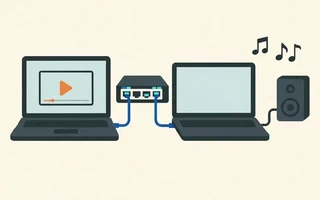
Pulseaudio
Way 1 - PULSE_SERVER Variable
On the server (computer where the sound will come from, ip 10.0.0.3)
Install
paprefsjulio@acer ~> sudo pacman -S paprefsOpen
paprefsand, inNetwork Server, check:Enable network access to local sound devices;Allow other machines on the LAN to discover local sound devices;Don't require authentication.
On the client (computer where the audio files are, ip 10.0.0.2)
Set the environment variable
$PULSE_SERVERand play a music file:julio@hp ~> export PULSE_SERVER=10.0.0.1 julio@hp ~> mplayer music.flac
If everything went well, you should be hearing the music on the server computer.
Way 2 - MPD
Enable network access to the Pulseaudio server using paprefs or with the following command:
julio@acer ~> pactl load-module module-native-protocol-tcp auth-anonymous=1
Or, in a more secure way:
julio@acer ~> pactl load-module module-native-protocol-tcp auth-ip-acl="127.0.0.1;10.0.0.2"
Add a new output to the ~/.mpd/mpd.conf file:
audio_output {
    type    "pulse"
    name    "Acer - Pulseaudio"
    server  "10.0.0.1"
    #sink   "remote_server_sink"
}
In the ncmpcpp menu 8, you can enable/disable this output.
RTP
PulseAudio only does multicast with RTP, which ended up dropping the home Wi-Fi.
julio@acer ~> pactl load-module module-rtp-recv
Controlling MPD with Android
Streaming via MPD
quality is for VBR (variable bitrate) and bitrate for CBR (constant bitrate)
MPD streaming http
In ~/.config/mpd.conf:
audio_output {
    type                "httpd"
    name                "My HTTP Stream"
    encoder             "vorbis"                # optional, vorbis or lame
    port                "8000"
    bind_to_address     "0.0.0.0"               # optional, IPv4 or IPv6
    bitrate             "128"                   # do not define if quality is defined
    format              "44100:16:1"
    max_clients "0"                     # optional 0=no limit
}
Just open a player (it can be a browser) at http://10.0.0.2:8000 and hit play.
MPD FIFO + netcat + VLC
In ~/.config/mpd.conf:
audio_output {
    type            "fifo"
    name            "FIFO2"
    path            "/tmp/mpd.fifo"
    format          "44100:16:2"
}
On the server:
nc -u 10.0.0.2 8765 < /tmp/mpd.fifo
On the client:
nc -u -l 8765 | ~/Applications/VLC.app/Contents/MacOS/VLC --demux=rawaud --rawaud-channels 2 --rawaud-samplerate 44100 --audio-desync=250 -
Links
- http://en.gentoo-wiki.com/wiki/PulseAudio
- http://wiki.openwrt.org/doc/howto/pulseaudio
- http://wm161.net/2007/06/24/how-pulseaudio-made-my-openhouse-awesome/
- http://www.freedesktop.org/wiki/Software/PulseAudio/Documentation/User/Network
- https://en.wikibooks.org/wiki/Configuring_Sound_on_Linux/Pulse_Audio/Remote_server
- https://wiki.archlinux.org/index.php/PulseAudio/Examples
- https://www.linux.com/learn/tutorials/332418:weekend-project-using-pulseaudio-to-share-sound-across-all-your-computers
- http://mpd.wikia.com/wiki/Configuration

I’m a Brazilian computer engineer based in Germany, passionate about tech, science, photography, and languages.
I’ve been programming for about two decades already, exploring everything from mobile apps and web development to machine learning. These days I focus on cloud SRE and data engineering.
I volunteer in the open source and Python communities, helping organize PyCon DE and PyData Berlin, mentoring, and contributing with code and translations.
On my blog, I share Linux tips, setup guides, and personal notes I’ve written for future reference. I hope others find them helpful as well. The content is available in multiple languages.
Browse my gallery for some of my photography.
Away from the keyboard, you’ll find me at concerts, playing clarinet, cycling, scuba diving, or exploring new places, cultures, and cuisines.
Always happy to connect! 🙂